
SWITCH TO US FOR A
SMART METER INSTALLATION
HOW TO READ METER
METER READING GUIDE
BASIC METERS VS SMART METERS
There are two main types of energy meters: basic meters and smart meters. While both measure how much energy you use, only the smart meter sends all its data back to CovaU automatically. Basic meters, on the other hand, need someone to come by every so often and manually read them for accuracy.
Smart meters are accurate, and provide more detailed information about how much energy you use. With a smart meter, you’ll never have to worry about estimating your bill again.
HOW TO SUBMIT YOUR OWN METER READINGS
If you have a basic meter, your bill will be estimated until a manual read can be conducted by one of our technicians. If you think your electricity and/or gas bill is inaccurate, or if you’ve had a few estimated bills in a row, it can be adjusted with the submission of your own meter readings. We’ve made submitting your own readings easy to do online.
TAKE A PHOTO
Take a time-stamped photo of your meter. (e.g., show a newspaper or receipt from that day in the photo)
CHECK ALL REQUIRED INFORMATION IS VISIBLE
Check the meter ID and meter read values are clearly visible before submitting your photo online.
SUBMIT ONLINE
Submit your photo online before your next payment due date for the accurate reading to be applied.
Please contact us on 1300 689 866 if you have received multiple estimated bills so we can organise a manual read to confirm accuracy.
HOW TO READ YOUR BASIC METER
You don’t need to know how to read your meter to submit your self-read to CovaU (a quick photo is all we need!). But you might be interested to know how to read your meter for your own knowledge to track how much energy you’re using and to stay within budget.
Most basic meters have a digital display. Some older-style meters use dials. All basic meters can be read by you to help you track your energy usage and spending over time.
ELECTRICITY
Read the numbers from left to right, without the last digit on the right. So if the display reads 096523, the meter read is 9652 kWh.
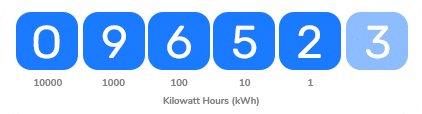
The meter read is 9652 kWh
GAS
Read the numbers from left to right, without the last 2 digits on the right. So if the display reads 09652.36, the meter read is 9652 m3.

The meter read is 9652 m3
ELECTRICITY
Read the numbers from left to right.
- Record the numbers from left to right.
- The needle may not be pointing directly at a number, instead resting between two numbers on the dial. If so, record the lower number. Record 9 if your needle is sitting somewhere in-between 0 and 9.
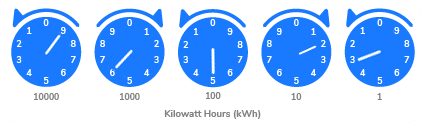
This meter read is 96523 kWh
GAS
- Record the numbers from left to right, ignoring the last two dials (labelled 1/2 and 2) on the bottom row.
- The needle may not be pointing directly at a number, instead resting between two numbers on the dial. If so, record the lower number. Record 9 if your needle is sitting somewhere in-between 0 and 9.
- Dial gas meters measure usage using the imperial system, which we then convert to metric for billing. You can do your own conversion at home to get a reading that will match your CovaU bill. So, if the dial reads 9652 ft3, this will be converted to 273 cubic meters.
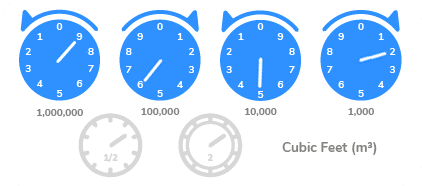
This meter read is 9652 ft3 = 273m3
How do I read my electricity meter?
On a digital electricity meter, read the numbers from left to right and leave out the last digit, so a display of 096523 is a read of 9652 kWh. On a dial meter, record each dial from left to right, and if a needle sits between two numbers, record the lower one.
How do I submit my own meter reading?
- Take a time-stamped photo of your meter.
- Check the meter ID and meter read values are clearly visible.
- Submit the photo online before your next payment due date.
Basic meter or smart meter: what is the difference?
| Basic meter | Smart meter | |
|---|---|---|
| How reads reach CovaU | Manual read by a technician or your own photo | Sent automatically |
| Estimated bills | Possible until a manual read | No more estimates |
| Self-reads needed | Yes, if your bill is estimated | No |